Two years ago, “running AI locally” meant wrestling with Python environments, manually downloading model weights, configuring CUDA, and debugging cryptic error messages — all to get a mediocre chatbot running at 3 tokens per second. Today, the experience is almost unrecognizable. Tooling has matured dramatically, model quality has caught up to hosted offerings for many tasks, and the hardware accessible to everyday users is genuinely capable.
In 2026, local LLMs are not just a technical curiosity. They are a practical alternative to cloud AI for a growing range of use cases. This guide covers everything you need to know: the best models, the best tools, the right hardware, and when local makes sense versus when to stick with the cloud.
Why Run AI Locally?
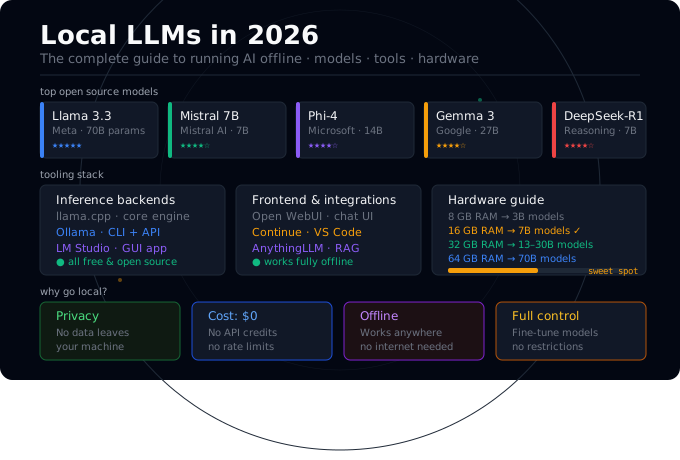
Before getting into the how, it is worth being clear about the why. There are four compelling reasons to run language models locally:
Privacy. Locally-run models receive no data from your machine. Every prompt, every document, every conversation stays on your hardware. This matters enormously for anyone working with sensitive data — lawyers drafting documents, doctors reviewing notes, developers working on proprietary code, or individuals who simply value their privacy.
Cost. API credits add up fast, especially during development. Running hundreds of test prompts through a cloud API can cost real money. Running the same prompts locally costs nothing beyond electricity.
Offline access. Local models work without an internet connection. This is valuable for field work, travel, air-gapped environments, or anywhere with unreliable connectivity.
Customization and control. You can run fine-tuned models, modify system prompts in ways cloud providers don’t allow, and build applications without worrying about API rate limits or terms-of-service changes.
The Best Open Source Models in 2026
The open source model landscape has never been stronger. Here are the standout options worth knowing:
Meta Llama 3.3 (70B) Meta’s latest flagship remains one of the best open source models available. The 70B version matches or exceeds GPT-4-class performance on many benchmarks. Requires serious hardware (64GB+ RAM or high-end GPU), but the 8B version is accessible to almost anyone and punches well above its weight.
Mistral and Mixtral Mistral AI continues to release excellent open-weight models. The 7B Instruct model is a go-to choice for general tasks on consumer hardware. Mixtral 8x7B (a mixture-of-experts architecture) delivers much better quality than its effective size suggests.
Microsoft Phi-4 Phi models are Microsoft’s series of small but remarkably capable language models. Phi-4 at 14B parameters offers surprisingly strong reasoning for its size — a strong choice for users with 16GB RAM who want quality without the overhead of larger models.
Google Gemma 3 Google’s Gemma 3 family, released with fully open weights in 2025, ranges from 1B to 27B parameters. The 27B version competes with much larger models and is available in quantized form for consumer hardware.
DeepSeek-R1 DeepSeek’s reasoning-focused models attracted significant attention in early 2025 and have since been refined further. The distilled versions (7B, 14B) bring chain-of-thought reasoning capabilities to local hardware.
Qwen2.5 Alibaba’s Qwen series offers excellent multilingual performance — particularly strong for users working in languages beyond English.
The Essential Tooling Stack
Running models locally involves three layers: a model file, an inference backend, and a frontend or API layer. Here is how the main tools fit together:
Inference Backends
llama.cpp is the foundation of the local AI ecosystem. Written in C++, it runs quantized models efficiently on CPU and GPU alike. It is the engine under the hood of most local AI tools.
Ollama wraps llama.cpp in a clean CLI and REST API, making model management trivial. One command to install, one command to pull a model, one command to run it. Ideal for developers and anyone comfortable with a terminal.
LM Studio provides a full desktop GUI built on top of llama.cpp. Browse models, download with a progress bar, chat visually, and run a local OpenAI-compatible server — no command line required.
Frontend and Integration Tools
Open WebUI (formerly Ollama WebUI) is a self-hosted chat interface that works with Ollama and other OpenAI-compatible backends. It supports multi-user access, conversation history, model switching, and even RAG from uploaded documents. Think ChatGPT’s UI running entirely on your own server.
Continue is a VS Code and JetBrains extension that brings local AI into your code editor. Point it at Ollama or LM Studio and get code completion, inline editing, and chat — entirely offline.
AnythingLLM is a desktop application that combines local LLMs with document ingestion. Drop in PDFs, Word files, or web pages and ask questions about them. A full private RAG system with no cloud dependency.
Hardware Guide: What You Actually Need
Apple Silicon Macs The best consumer hardware for local AI, full stop. Apple’s unified memory architecture means the GPU and CPU share the same memory pool — a MacBook Pro with 32GB RAM can comfortably run 13B models at usable speeds, and a Mac Studio or Mac Pro with 64–192GB unified memory can run 70B models. Metal acceleration works out of the box with Ollama and LM Studio.
NVIDIA GPUs Dedicated NVIDIA GPUs remain the fastest option for inference. An RTX 4090 with 24GB VRAM runs 13B models extremely fast and handles quantized 70B models in split CPU/GPU mode. For serious local AI workloads, NVIDIA hardware with CUDA support is hard to beat on raw throughput.
Consumer Laptops and PCs With 16GB of RAM and a recent CPU, you can run 7B models at acceptable speed entirely on CPU. It is slower than GPU inference, but for tasks where you are reading the output rather than streaming it, CPU inference is often fast enough. The Phi-4 14B and Gemma 27B at Q4 quantization are pushing what is possible on mid-range hardware.
Minimum Practical Configuration
| Use Case | RAM | Example Models |
|---|---|---|
| Basic chatbot / Q&A | 8 GB | Phi-4-mini, Gemma 3 1B, Llama 3.2 3B |
| Code assistance | 16 GB | Mistral 7B, Llama 3.2 8B, Phi-4 14B |
| Complex reasoning | 32 GB | Llama 3.3 70B (quantized), Qwen2.5 32B |
| Near frontier quality | 64 GB+ | Llama 3.3 70B full, Mixtral 8x22B |
When to Use Local vs Cloud
Local LLMs are powerful, but they are not always the right choice. Here is a practical framework:
Use local AI when:
- You are working with sensitive or confidential data
- You need offline access
- You are running many repetitive prompts during development
- You want to experiment with model behavior without restrictions
- Cost is a significant concern
Stick with cloud AI when:
- You need frontier-level reasoning or creative quality
- You are building a production consumer product that needs reliability
- Your hardware is limited (4GB RAM or less)
- You need multimodal capabilities (vision, audio) that local models do not yet handle well
- Latency is critical (hosted APIs are still faster for most users)
The honest assessment is that the capability gap between the best local models and the best cloud models has narrowed dramatically — but it has not closed. For many everyday tasks (summarization, code review, writing assistance, Q&A), local 7B–13B models are genuinely good enough. For complex multi-step reasoning or sophisticated creative work, cloud models still have an edge.
Getting Started: Your 3-Step Action Plan
If you are new to local AI, here is the fastest path from zero to running:
Step 1: Download LM Studio (lmstudio.ai). It is the most beginner-friendly entry point and works on any modern Mac, Windows, or Linux machine.
Step 2: Download the Mistral-7B-Instruct-v0.3.Q4_K_M.gguf model from within LM Studio. At roughly 4.5GB, it fits on almost any machine and represents an excellent quality/performance balance for general tasks.
Step 3: Start chatting — or launch the local server and point your favorite tool at localhost:1234.
Once you have the basics working, explore Ollama for tighter developer integration, Open WebUI for a full ChatGPT-style interface, or AnythingLLM if you want to build a private document assistant.
The Bigger Picture
Local AI is not a niche hobby anymore. It is a mature, practical alternative to cloud AI for a significant range of tasks. The combination of increasingly capable open-weight models, excellent tooling, and hardware that finally does the job has created an ecosystem that genuinely works.
The ability to run a capable language model offline, privately, and for free is one of the most meaningful democratizing forces in the history of software. Whether you are a developer, researcher, privacy advocate, or simply curious, the barrier to entry has never been lower.
Your AI can now live on your machine. It is time to bring it home.