For years, running a large language model meant paying for API credits, sending your data to a remote server, and accepting the latency that comes with it. Ollama changes that completely. It is one of the simplest, most powerful open source tools available today for running AI models directly on your own machine — no cloud, no subscriptions, no data leaving your computer.
Whether you are a developer who wants to experiment with AI without burning through API budgets, a privacy-conscious user who wants to keep conversations local, or an engineer building an offline AI-powered application, Ollama deserves a serious look.
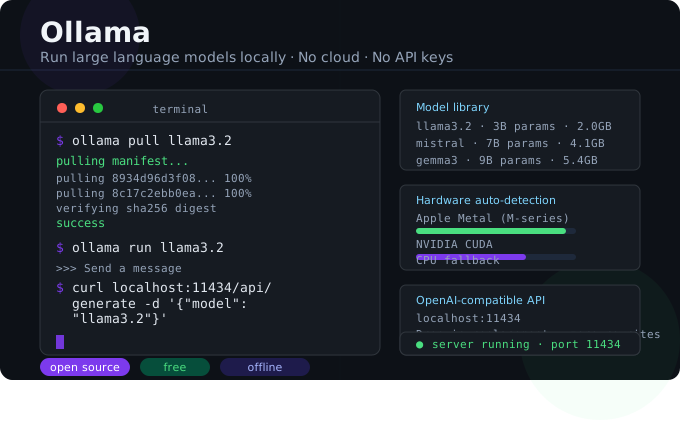
What Is Ollama?
Ollama is an open source runtime that lets you download, manage, and run large language models (LLMs) locally through a simple command-line interface. Think of it like Docker, but for AI models. You pull a model with a single command, and it runs.
Under the hood, Ollama uses llama.cpp — a highly optimized C++ inference engine — and wraps it in a clean, developer-friendly interface. It exposes a local REST API on port 11434, which means any application that can make an HTTP request can talk to your local model.
Why Ollama Stands Out
The open source local AI space has grown crowded over the past two years. So what makes Ollama worth your attention in 2026?
Dead-simple installation. On macOS, Linux, or Windows, you are up and running in under five minutes. There is no dependency hell, no CUDA configuration nightmare (unless you want GPU acceleration, which is optional), and no Python environment to manage.
A rich model library. Ollama ships with a built-in model registry. With a single command you can pull Meta’s Llama 3, Mistral, Google’s Gemma, Microsoft’s Phi, DeepSeek, Qwen, and dozens more. New models are added as the community packages them.
Automatic hardware optimization. Ollama detects your hardware and automatically chooses the best inference path — GPU layers via Metal on Apple Silicon, CUDA on NVIDIA cards, or CPU fallback on everything else. You do not need to think about it.
A local OpenAI-compatible API. Ollama’s REST API follows the same structure as OpenAI’s API. This means you can point many existing tools and libraries directly at your local Ollama instance with minimal code changes.
Getting Started in Under 5 Minutes
Step 1 — Install Ollama
On macOS or Linux, open your terminal and run:
bash
curl -fsSL https://ollama.com/install.sh | shOn Windows, download the installer from ollama.com. The app installs as a background service.
Step 2 — Pull a Model
bash
ollama pull llama3.2This downloads the Llama 3.2 3B model (~2GB). For a more capable model, try:
bash
ollama pull mistralStep 3 — Start Chatting
bash
ollama run llama3.2You now have an interactive chat session running entirely on your machine.
Step 4 — Use the API
bash
curl http://localhost:11434/api/generate \
  -d '{
    "model": "llama3.2",
    "prompt": "Explain transformers in simple terms",
    "stream": false
  }'
That is all it takes to integrate a local LLM into any application.
Hardware Requirements
One of the most common questions about local LLMs is: what hardware do I need?
The honest answer is that it depends on the model. Here is a practical guide:
| Model Size | RAM Required | Recommended Hardware |
|---|---|---|
| 1B–3B parameters | 4–6 GB | Most modern laptops |
| 7B parameters | 8–10 GB | MacBook Air M-series, mid-range PC |
| 13B parameters | 16 GB | MacBook Pro, gaming PC |
| 30B+ parameters | 32 GB+ | High-end workstation |
Apple Silicon Macs (M1 and newer) are exceptional for local AI because they use unified memory — the GPU and CPU share the same memory pool, allowing larger models to run efficiently even on base configurations.
Real-World Use Cases for Ollama
Code completion and review. Point your IDE or a tool like Continue.dev at your local Ollama instance and get AI-powered code suggestions without any data leaving your machine. This is especially valuable in enterprise environments with strict data policies.
Document summarization. Feed local documents into the API and get summaries, extractions, or Q&A — entirely offline. No third-party ever sees your files.
RAG (Retrieval-Augmented Generation). Combine Ollama with a vector database like ChromaDB or Weaviate to build a private knowledge base that answers questions from your own documents.
Prototyping and experimentation. Stop paying for API calls during development. Run hundreds of test prompts locally for free while you fine-tune your application.
Limitations to Know
Local LLMs are impressive, but they are not without trade-offs.
The largest frontier models — GPT-4o, Claude 3.5 Sonnet, Gemini 1.5 Pro — are still significantly more capable than what you can run locally on consumer hardware. If you need cutting-edge reasoning, creative writing, or complex multi-step tasks, cloud APIs still have an edge.
Speed is also a factor. Even on fast hardware, local 7B models run at 20–50 tokens per second — noticeably slower than the sub-second streaming you see from hosted APIs. Larger models are slower still.
That said, for many use cases — summarization, code assistance, classification, simple Q&A — locally-run 7B or 13B models are genuinely good enough, and the privacy and cost benefits are hard to argue with.
The Bottom Line
Ollama has done more to democratize local AI than almost any other tool in the open source ecosystem. Its combination of simplicity, hardware optimization, and a growing model library makes it the natural starting point for anyone who wants to run AI locally in 2026.
If you have never tried it, set aside 15 minutes today. You might be surprised how capable your own machine already is.