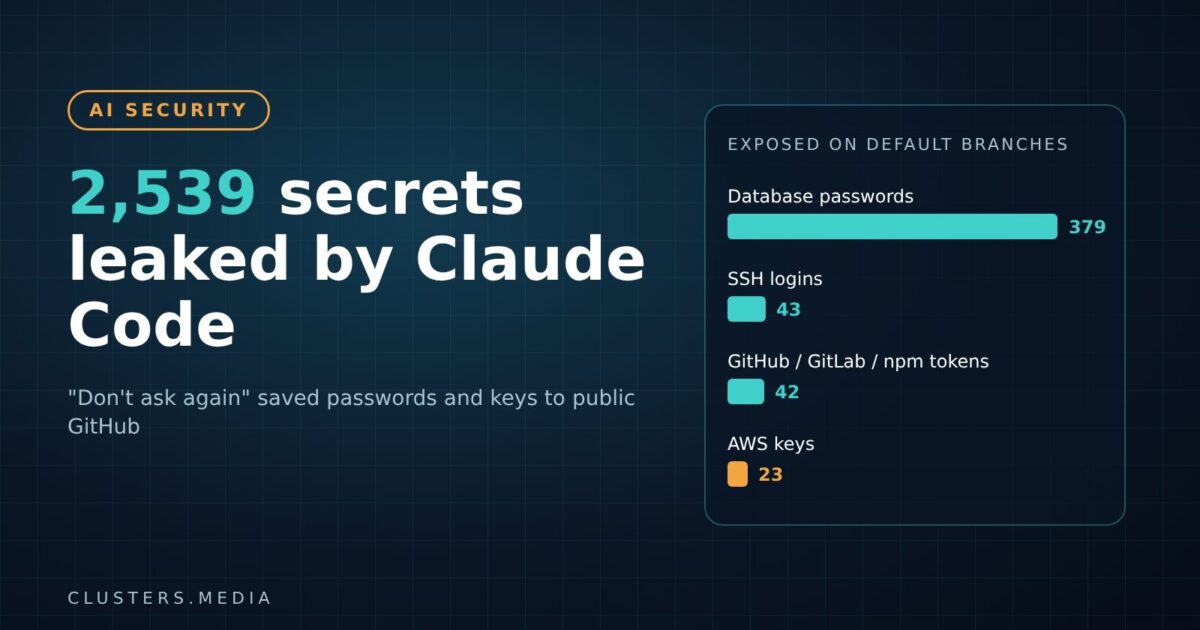
A Claude Code secrets leak has put thousands of real passwords and API keys on public GitHub. Security firm Apiiro found that when developers click “Yes, and don’t ask again” on a command that contains a credential, Claude Code can save that command, secret included, in plain text inside the project folder. Counting older commits, forks and shared settings files, the researchers found 2,539 secrets across 1,994 public repositories.
The research, by Apiiro’s Shmulik Cohen and Matan Giladi, was reported by The Hacker News on November 7 and has since been picked up across the security press. If you use Claude Code in any repository that is public, or that might become public, this is worth ten minutes today.
Key takeaways
- Choosing “Yes, and don’t ask again” saves the approved command word for word as an allow rule in
.claude/settings.local.json. - If that command had a password or token in it, the secret now sits in plain text in your project.
- Apiiro found at least one secret in 1,122 of 104,185 public copies of the file, about 1.1%.
- Popular scanners gitleaks and TruffleHog both missed 215 of those 1,122 files.
- Fix order matters: rotate the credential first, then remove the file from git and ignore it.
What happened
Claude Code asks for permission before running shell commands. One of the answers is “Yes, and don’t ask again”, which turns your approval into a standing rule. According to Anthropic’s own settings documentation, those approvals are written to .claude/settings.local.json, a per-project file meant for your personal overrides.
The problem is what gets saved. If you approve an exact command, the exact text is stored. A command such as a database login with the password typed inline, an sshpass call, or a curl request with a bearer token in the header becomes a permanent line in a JSON file inside your repository.
Anthropic’s docs say Claude Code adds the file to your global git excludes the first time it writes it in a git repository. That keeps it out of your own commits on that machine. But Apiiro points out that it never adds the file to the project’s .gitignore, so the protection does not travel with the repository. A teammate on another machine, a CI job, a git add -f, or a file created before the exclude existed can all push it upstream.
What Apiiro found on GitHub
Apiiro scanned public GitHub in early November and found 104,185 copies of settings.local.json in 103,617 repositories. Of those, 1,122 held at least one live-looking secret, adding up to 1,379 distinct secrets on default branches. Among them, the researchers counted 379 database passwords, 43 SSH logins for public servers, 42 GitHub, GitLab or npm tokens and 23 AWS keys, according to The Hacker News and Daily CyberSecurity.
The total grows once you look beyond the current branch. Older versions of the file added 734 secrets across 509 repositories, 211 forks carried copies, and 298 shared .claude/settings.json files also contained secrets. With agent chat logs included, the count reached 2,539 secrets in 1,994 repositories. Apiiro says 63 identifiable organizations were affected, and that in 539 of 1,105 traced repositories a commit co-authored by Claude itself had changed the file.
Apiiro did not test whether the credentials worked. It notified affected organizations, and at least one confirmed its exposed key was live. There is no public evidence so far that any of these secrets were used by attackers.
Why it matters
Leaked keys on GitHub are an old problem, but this one has three features that make it worse than a stray .env file.
First, it is invisible in normal use. Developers never type the secret into the settings file. The agent writes it as a side effect of a convenience button, so few people think to check it.
Second, standard scanners miss a lot of it. Of the 1,122 secret-bearing files, gitleaks flagged 564 and TruffleHog flagged 643. Both missed 215. Most misses were passwords passed as command arguments, after things like PGPASSWORD=, sshpass -p or mysql -p, which do not match the patterns those tools look for.
Third, deleting the file does not help. Git history and forks keep old copies. Apiiro found every secret-bearing file still on its default branch at the time of the scan, and in half of those repositories it had been there for at least 217 days.
Apiiro also says that, of 16 coding agents it compared, Claude Code was the only one confirmed to save the full approved command in a project file by default. The researchers reproduced the behavior with current models including Opus 5.5. Users have flagged the mechanism in public GitHub issues since August 2025; Apiiro says those reports were closed automatically without a reply. At the time of writing, Anthropic had not published a statement or a fix for this specific behavior. We will update this story if that changes.
What developers should do now
The steps below follow Apiiro’s guidance and basic secret-hygiene practice. Do them in order.
- Find the files. Search your repositories and organization for
.claude/settings.local.jsonand.claude/settings.json, including git history, not just the current branch. - Rotate first. Any password, token or key that ever appeared in those files should be treated as exposed. Rotate it before you clean anything up.
- Untrack and ignore. Run
git rm --cached .claude/settings.local.jsonand add the path to the project’s.gitignore, so the rule travels with the repo. - Clean local copies. Delete any allow rule that contains a secret, even in files you never committed.
- Stop typing secrets into commands. Reference environment variables or a secrets manager, for example
$DB_URL, so the saved rule holds a name, not a value. - Approve patterns, not exact commands. A wildcard rule such as
Bash(npm run test *)covers the work without storing arguments.
For security teams, the wider lesson is that agent folders are now secret-bearing. Treat .claude/, .cursor/, .gemini/ and similar directories, plus agent memory and chat-log files, the way you treat .env. Add them to pre-commit hooks and CI scanning, scan history as well as the head, and tune scanners to catch passwords inside command strings. If you missed it, our earlier report on the trojanized Claude Code extension that hit Cursor users shows how quickly AI coding tools have become a target in their own right.
What it means for teams adopting AI coding agents
Coding agents need standing permissions to be useful. Nobody wants to approve the same test command fifty times a day. But every convenience feature that remembers a decision is also a place where sensitive data can pile up. As agents gain more autonomy, the files they write about themselves deserve the same review as the code they write for you.
The same pressure is showing up across the industry. AI tools are now finding vulnerabilities at scale, as with OpenAI’s GPT-6 Cyber, while the agents themselves create new attack surface. Teams that set clear rules now, such as no inline secrets, pattern-based approvals and scanning of agent config, will avoid cleaning up a leak later.
What to watch next
- Whether Anthropic changes the default, for example by storing patterns instead of full commands, redacting secrets, or writing a project-level
.gitignoreentry. - Updates from gitleaks, TruffleHog and GitHub secret scanning to catch passwords inside saved agent commands.
- Reports of any of the exposed credentials being abused, which would raise the stakes for organizations that have not rotated yet.
- Similar audits of other agents’ config and memory files, which Apiiro’s work makes an obvious next target.
Sources: Claude Code settings documentation (Anthropic), The Hacker News, Daily CyberSecurity, with the original research by Apiiro.