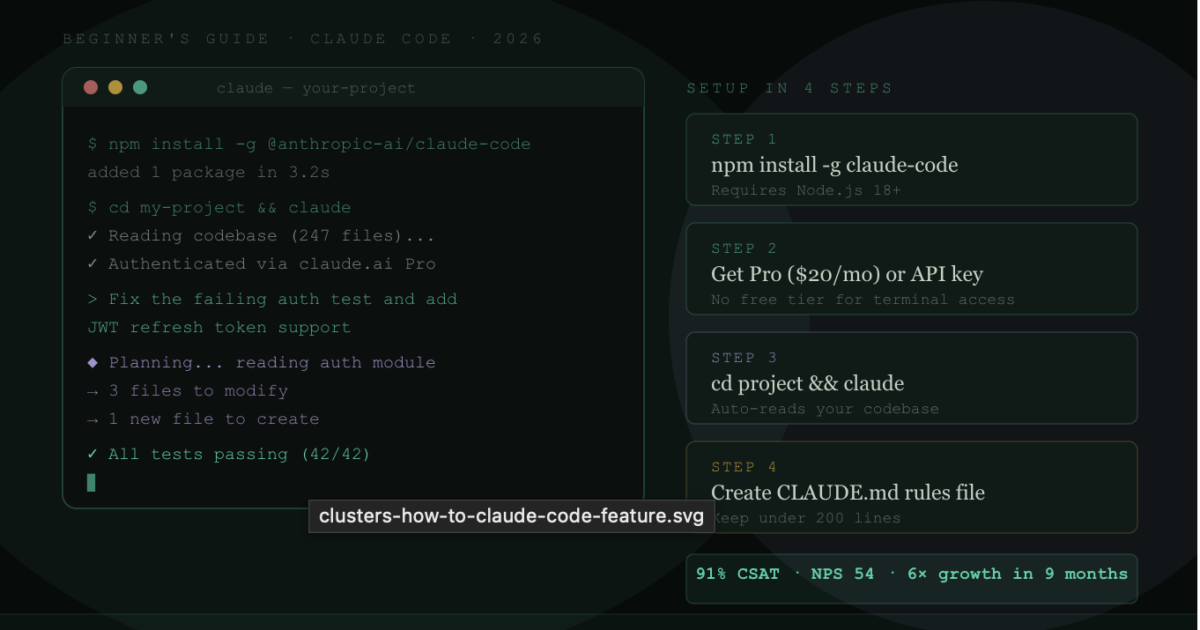
Developer Tutorial · Claude Code · Step-by-Step Guide · April 2026
Claude Code went from 3% developer adoption in April 2025 to 18% by January 2026 — a 6× increase in nine months. It now holds the highest product satisfaction score of any AI coding tool on the market. If you haven’t tried it yet, this guide takes you from zero to productive in one sitting.
What Is Claude Code?
Claude Code is Anthropic’s terminal-native coding agent. Unlike Cursor or GitHub Copilot — which live inside a code editor — Claude Code runs in your command line alongside whatever editor you already use. You give it goals in plain English. It reads your codebase, writes code, runs commands, interacts with git, fixes errors, and reports back when the task is done.
The key difference from earlier AI coding tools: Claude Code doesn’t just suggest code — it acts. It can open files, write to them, execute bash commands, run your tests, read the output, fix the failures, and commit the results. That autonomy is both its greatest strength and the reason you need to understand it before you use it on anything important.
Step 1 — Prerequisites
What You Need Before Installing
- Node.js 18+ — Claude Code is distributed as an npm package. Run
node --versionto check. If you don’t have Node.js, install it from nodejs.org. - A Claude account — Go to claude.ai and sign up if you haven’t already.
- A Pro subscription or API credits — There is no free tier for terminal Claude Code. Pro is $20/month. Alternatively, set up API access at console.anthropic.com for pay-as-you-go billing.
- Basic terminal comfort — Claude Code lives in the command line. You don’t need to be a terminal expert, but you should be comfortable navigating directories and running commands.
Step 2 — Installation
Open your terminal and run:
npm install -g @anthropic-ai/claude-codeOnce installed, verify it worked:
claude --versionYou should see a version number like claude-code 2.x.x. If you see a “command not found” error, your npm global bin directory may not be in your PATH. Check your npm configuration with npm config get prefix and add the resulting /bin directory to your PATH.
Step 3 — Authentication
Run Claude Code for the first time:
claudeYou’ll be prompted to authenticate. Two options:
Authentication Options
- Login with Claude.ai (recommended for beginners): Select this option and your browser will open to Claude.ai’s OAuth flow. Log in with your existing account. Your Pro or Max subscription covers your Claude Code usage — no separate API billing.
- API key (for power users and CI/CD): Go to console.anthropic.com → API Keys → Create new key. Set it as an environment variable:
export ANTHROPIC_API_KEY=your_key_here. Billing is pay-per-token — you pay exactly for what you use, which can be cheaper or more expensive than a subscription depending on volume.
Step 4 — Your First Session
Navigate to a project directory and start Claude Code:
cd your-project-folder
claude
You’re now in an interactive session. Claude Code has read the structure of your project and is ready for instructions. Try something simple first:
> What does this project do? Give me a summary of the main components.Claude Code will read your files and give you a structured overview. This is useful for onboarding to unfamiliar codebases — but it also shows you that Claude Code actually reads your code, not just file names.
Step 5 — Core Commands You Need to Know
Essential Claude Code Commands
/help— Show all available commands. Run this first in any new session./plan— Ask Claude to show its plan before executing. Critical for any multi-file task — review the plan before it makes changes./cost— Shows per-model cost breakdown, cache hit rates, and rate-limit utilisation for the current session. Check this when a session feels expensive./compact— Summarises prior turns and replaces them, reducing context bloat. Use at natural breakpoints (after completing a feature) to keep sessions efficient./clear— Starts a fresh conversation. Use when switching topics to prevent geometric cost inflation from growing context./context— Debug context issues and understand what’s loaded. Useful when approaching context limits.Ctrl+C— Interrupt Claude Code mid-task. Use this if it’s doing something unexpected.exit— End the session.
Step 6 — Writing Effective Prompts
The difference between good and bad Claude Code results is almost entirely in how you describe what you want. Here are the patterns that work:
Be specific about what you want, not how to do it
Bad: “Fix the bug”
Good: “The user login endpoint returns a 500 error when the email contains a plus sign. Diagnose the cause and fix it. Run the auth tests after fixing.”
Give context about constraints
Bad: “Add pagination to the API”
Good: “Add cursor-based pagination to the /api/posts endpoint. We use PostgreSQL. Keep it compatible with our existing response format. Add tests for the pagination logic.”
Use Plan mode for anything complex
Before any multi-file task, ask Claude Code to show its plan first:
> /plan Refactor the authentication module to use JWT instead of session cookiesReview the plan. If it looks wrong, correct it before Claude starts making changes. This single habit will save you from most frustrating Claude Code experiences.
Break large tasks into phases
For very large tasks, don’t give Claude Code the entire job at once. Give it Phase 1, confirm the results, then move to Phase 2. Long single-session tasks accumulate context geometrically, slowing responses and increasing cost.
Step 7 — Setting Up CLAUDE.md
CLAUDE.md is a markdown file in your project root that Claude Code reads at the start of every session. Think of it as standing instructions for your project. Done well, it dramatically improves Claude Code’s output. Done poorly, it costs you tokens on every single turn.
What to Put in CLAUDE.md
- Tech stack: “This is a Next.js 15 app using TypeScript, Tailwind CSS, and PostgreSQL via Drizzle ORM.”
- Architecture decisions: “We use server components by default. Only use client components when necessary for interactivity.”
- Coding conventions: “Use named exports, not default exports. Prefer functional components. Tests go in __tests__ directories colocated with the code.”
- What to avoid: “Never modify the legacy /api/v1 endpoints. Never use any library not already in package.json without asking first.”
- How to run things: “Run tests with: pnpm test. Start dev server with: pnpm dev.”
Critical rule: Keep CLAUDE.md under 200 lines. It injects into every request — a 5,000-token CLAUDE.md is a 5,000-token tax on every single turn. Document conventions and constraints only, not aspirations or what Claude can already infer from your code.
Step 8 — Cost Management
Claude Code’s biggest learning curve is understanding and controlling costs. Here are the most impactful moves:
Default to Sonnet 4.6, escalate to Opus manually. Sonnet 4.6 handles most coding tasks excellently. Reserve Opus 4.6/4.7 for genuinely complex reasoning tasks. Defaulting to Opus costs 1.7× more per token.
Use /compact at natural breakpoints. After completing a feature or a phase of work, run /compact. It summarises the session history and replaces it, keeping the important decisions but dropping intermediate attempts. Long sessions are geometric cost machines.
Use /clear on topic switches. When you finish one task and start a completely different one, use /clear rather than continuing the same session. Context from the previous task adds overhead without value.
Audit MCP servers monthly. Each connected MCP server loads tool definitions into every message — up to 18,000 tokens of overhead per turn. Multiple servers compound. Disconnect anything you haven’t used in the last week.
Enable prompt caching if using the API. Prompt caching reduces repeated context costs by up to 90%. For coding sessions where the system context, CLAUDE.md, and project files stay constant across turns, caching is the single highest-impact cost lever.
Step 9 — Common Workflows
Debugging a failing test
> The test UserAuth.spec.ts:line 42 is failing with "Cannot read property 'token' of undefined". Read the test, find the root cause, fix it, and confirm the test passes.Building a new feature
> /plan Add a password reset flow. Users should receive an email with a one-hour token. Include the email service integration, the API endpoints, and the frontend form. Show me the plan before starting.Code review on a PR
> Review the changes in the last git commit. Look for security issues, performance problems, and anything that violates our conventions in CLAUDE.md. Give me a structured review.Understanding an unfamiliar codebase
> I just joined this project. Explain the overall architecture, the main data flows, and any non-obvious design decisions I should know about before touching the code.What to Avoid — Common Mistakes
Mistakes That Will Cost You Time and Money
- Running complex tasks without /plan: Always review Claude’s plan before it executes multi-file changes. A wrong assumption caught in the plan costs nothing. A wrong assumption caught after 200 file changes costs an hour of reverting.
- Long sessions without /compact: Sessions that run to hundreds of turns become slow and expensive. Use /compact after completing each phase of work.
- Giving Claude access you don’t need: Claude Code can execute bash commands and modify files. Don’t give it SSH access to production servers or credentials it doesn’t need for the current task.
- Defaulting to Opus for everything: Sonnet 4.6 handles the vast majority of coding tasks. Opus for every session can push your monthly cost from $20 to $100+ without proportional benefit.
- No .claudeignore file: Like .gitignore, this tells Claude Code what to skip. Add node_modules, build directories, and any sensitive files you don’t want Claude reading.
FAQ
Is Claude Code free?
No. There is no permanent free tier for terminal Claude Code. The Pro plan starts at $20/month and is the entry point. Alternatively, API pay-as-you-go access starts at $3 per million input tokens for Sonnet 4.6. The Claude.ai free tier gives you web chat access but not terminal Claude Code.
What is the CLAUDE.md file?
CLAUDE.md is a project-specific instruction file that Claude Code reads at the start of every session. It contains your tech stack, coding conventions, architectural constraints, and what to avoid. Keep it under 200 lines — it injects into every request, so every line costs tokens on every turn.
How do I reduce Claude Code costs?
Six highest-impact moves: default to Sonnet 4.6 (not Opus), use /compact at natural breakpoints, use /clear when switching topics, audit and disconnect unused MCP servers, enable prompt caching if on the API, and use Plan mode to avoid costly wrong-direction execution. Teams combining these report 40–85% cost reductions.
Can Claude Code run tests?
Yes. Claude Code can execute bash commands, including your test runner. A common pattern is: “Fix this bug and run the tests to confirm it’s resolved.” It will read the test output, fix remaining failures, and iterate until the tests pass.
How is Claude Code different from GitHub Copilot?
GitHub Copilot is primarily an inline autocomplete tool that suggests code as you type. Claude Code is a terminal agent that autonomously completes multi-step tasks — reading files, writing code, running commands, fixing errors, and committing results. They’re different tools for different purposes, and many developers use both.
Sources: JetBrains AI Pulse Survey Jan 2026, Verdent AI guides, SSD Nodes Claude Code pricing guide, Finout Claude Code pricing, LaoZhang AI blog, ClaudeLog, Anthropic official pricing page (April 2026) · April 2026 · clusters.media