Developer Tools · AI Agents · Advanced Coding · April 2026
The first generation of AI coding tools gave you one assistant. The next generation gives you a team of them. Multi-agent coding — where specialised AI agents collaborate on different parts of a problem simultaneously — is moving from experimental feature to production workflow in 2026. Here’s what it is, how it works, and how to set it up.
What Is Multi-Agent Coding?
Multi-agent coding is the practice of running multiple AI coding agents simultaneously, each focused on a specific sub-task, coordinating toward a shared goal. Instead of one AI handling everything sequentially — which creates bottlenecks on large tasks — you orchestrate a team of agents that work in parallel.
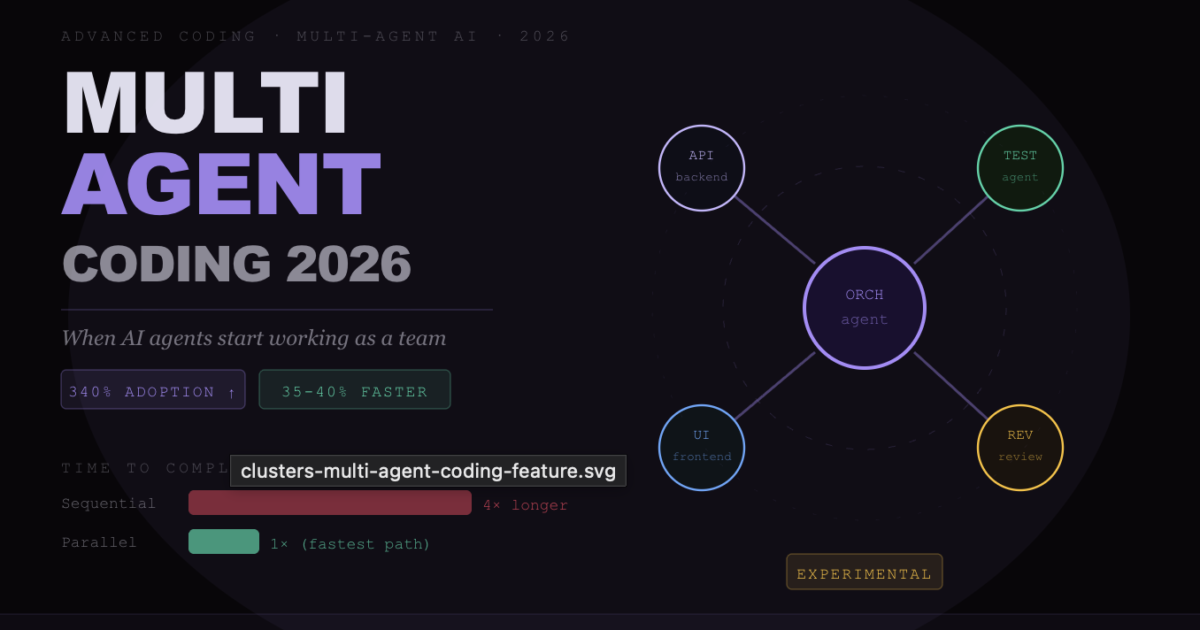
The analogy is accurate: it’s like having a team of developers where each person owns a specific component. One agent writes the backend API. Another writes the tests. Another handles the frontend integration. A fourth reviews the combined output for consistency. They work simultaneously, then their outputs are merged.
Single Agent vs Multi-Agent — The Core Difference
- Single agent: You give Claude Code a task → it completes Step 1 → then Step 2 → then Step 3. Total time = sum of all steps. Each step is bottlenecked by the previous one.
- Multi-agent: You give an orchestrator agent a task → it spawns Agent A (backend), Agent B (tests), Agent C (frontend) → they work in parallel → orchestrator merges and reviews. Total time ≈ longest single sub-task, not sum of all.
The Two Architectures — Parallel and Sequential
Parallel Agents (Speed-focused)
Multiple agents work on independent sub-tasks simultaneously using Git worktree isolation. Each agent gets its own branch of the codebase to work on. When all agents complete their tasks, the orchestrator reviews and merges the outputs.
Best for: Large feature builds where multiple components are genuinely independent. UI + API + tests for a new feature. Multi-platform builds. Documentation generation alongside code changes.
Sequential Agents (Quality-focused)
Agents hand off to each other in a defined chain — each agent reviews and builds on the previous agent’s output. A writer agent produces code, a reviewer agent critiques it, a fixer agent applies the review, a test agent verifies the fixes.
Best for: High-quality output on complex logic where errors in one phase would cascade. Security-sensitive code. Production-critical systems where thoroughness matters more than speed.
Claude Code Agent Teams
Claude Code’s native multi-agent capability is called Agent Teams. As of April 2026, it is in experimental status and requires enabling a flag:
claude --enable-agent-teamsAgent Teams spawns multiple Claude Code instances simultaneously, each with its own token budget and context window. The instances communicate through a shared workspace, with an orchestrator agent coordinating the work.
Claude Code Agent Teams — What You Need to Know
- Status: Experimental in April 2026. GA timeline not yet announced. Use in production with appropriate testing.
- Token budget: Each agent instance consumes its own token budget. Running 3 parallel agents burns 3× the tokens of a single agent session. Only use Max 20x ($200/month) or API billing for serious Agent Teams work.
- Isolation: Each agent gets an isolated Git worktree, preventing agents from conflicting on the same files simultaneously.
- Orchestration: One agent acts as the orchestrator — breaking the overall task, delegating to sub-agents, reviewing their outputs, and coordinating the merge.
- Best use cases: Large-scale refactors, multi-service architectures, comprehensive test suite generation, full-stack feature builds.
The Cursor + Claude Code Multi-Agent Stack
The most battle-tested multi-agent coding workflow in 2026 doesn’t use a single tool — it uses Cursor and Claude Code together as complementary layers of a coding stack.
This is the pattern emerging from teams like Kalvium Labs (200+ engineers) and Kyrylai (a Toronto venture studio) who have standardised on it:
The Cursor + Claude Code Workflow Stack
- Layer 1 — Real-time editing (Cursor): Cursor handles inline autocomplete, quick edits, and the visual editor experience. This is where the developer spends most of their keystrokes.
- Layer 2 — Feature development (Claude Code): For any task requiring multi-file changes, new feature builds, or architectural reasoning, you hand off to Claude Code in the terminal. It reads the full project context and executes autonomously.
- Layer 3 — PR review (Claude Code): After feature development, Claude Code reviews the pull request diff — checking for security issues, convention violations, and logic errors. Kalvium reports this catches 2–3 production bugs weekly that would have made it to main.
- Layer 4 — Orchestration (optional): For large tasks, multiple Claude Code instances run in parallel worktrees. Cursor is used to review and merge their outputs.
Kalvium Labs standardised this workflow across 200+ engineers in late 2025. They report 35–40% reduction in time-to-first-commit and a meaningful improvement in code review quality — with the AI catching issues that human reviewers under deadline pressure typically miss.
Building Your First Multi-Agent Workflow
You don’t need Agent Teams to benefit from multi-agent patterns. The simplest multi-agent setup uses multiple terminal sessions and Git branches:
The 3-Agent Feature Build
Terminal 1 — Backend agent:
cd your-project
git checkout -b feature/api-layer
claude
> Build the REST API endpoints for the user profile feature.
  Endpoints: GET /api/users/:id, PUT /api/users/:id, DELETE /api/users/:id.
  Follow the patterns in src/api/posts.ts. Include input validation and error handling.
Terminal 2 — Test agent:
cd your-project
git checkout -b feature/tests
claude
> Write comprehensive tests for the user profile API endpoints being built in the feature/api-layer branch.
  Check out that branch for reference. Cover happy paths, validation errors, auth failures, and edge cases.
Terminal 3 — Frontend agent:
cd your-project
git checkout -b feature/ui-layer
claude
> Build the React components for the user profile edit page.
  It should connect to the API endpoints in feature/api-layer.
  Match the design patterns in src/components/PostEditor.tsx.
Once all three complete, you review each branch, merge them into a integration branch, and run a fourth Claude Code session to handle any conflicts and run the full test suite.
The Ben Marshall Method — Rules for Architectural Consistency
The most sophisticated documented multi-agent coding project in 2026 is ForexFlow — a 200,000-line forex trading platform built by a single developer, Ben Marshall, using Cursor and Claude Code across 195 commits. What made it work at that scale:
How Ben Marshall Kept 200K Lines Consistent Across AI Agents
- 11 path-scoped rule files: Different CLAUDE.md-style instructions for different parts of the codebase. The API layer has different conventions than the frontend layer.
- 9 “skills” — repeatable workflows: Documented patterns for common tasks (adding a new API endpoint, adding a new chart component) so every agent follows the same process.
- MCP servers for live data: Custom MCP servers provided agents with live trading data, reducing AI errors from outdated or hallucinated market structure assumptions.
- The rule: “AI coding works when you build the system around it. Rules constrain. Hooks enforce. Skills keep workflows consistent.”
The lesson: multi-agent coding at scale is not about giving AI more autonomy — it is about designing better constraints that keep multiple agents architecturally aligned.
Governance and Safety in Multi-Agent Workflows
Multi-agent coding amplifies both the benefits and the risks of single-agent coding. When one agent produces a wrong assumption and passes it to the next agent as authoritative input, errors compound. The governance rules that matter most:
Always use Plan mode before parallel execution. Before spawning multiple agents on a large task, have the orchestrator agent describe the full plan — what each sub-agent will do, what files they’ll touch, and how the outputs will be merged. Catching a wrong assumption at this stage costs nothing. Catching it after three parallel agents have executed costs an hour of reverting.
Require human review at merge points. Never let agents automatically merge their own outputs into main. Every merge is a human checkpoint. The agents do the parallel execution; you do the architectural review.
Keep sub-agent scopes small and non-overlapping. The most common multi-agent failure mode is two agents editing the same file simultaneously and creating conflicting changes. Define sub-agent boundaries by directory or module, not by feature, to make overlaps structurally impossible.
Test after every merge, not just at the end. Run your full test suite after each sub-agent output is merged in. Don’t accumulate unmerged changes across multiple agents before testing — debugging compound failures is significantly harder than debugging incremental ones.
The Road Ahead — What Multi-Agent Coding Looks Like in 2027
Multi-agent coding is still in its early stages in 2026. The patterns that will define 2027 are already visible in cutting-edge teams:
Persistent agent memory — agents that remember architectural decisions across sessions and apply them automatically. Self-improving agents that update their own rule files when they discover a new convention in the codebase. Automated PR agents that monitor CI failures and autonomously push fixes. Continuous multi-agent workflows that operate in the background while the human developer does other work, surfacing results when ready for review.
Jensen Huang called it at GTC 2026: “Employees will be supercharged by teams of frontier, specialised and custom-built agents they deploy and manage.” The operative word is manage — the developer’s role in a multi-agent workflow is increasingly director, reviewer, and architect rather than typist.
FAQ
What is multi-agent coding?
Multi-agent coding is running multiple AI coding agents simultaneously on different sub-tasks, coordinating toward a shared goal. Instead of one agent completing steps sequentially, multiple agents work in parallel — an orchestrator agent assigns tasks to specialised sub-agents, they execute simultaneously, and the outputs are reviewed and merged.
Does Claude Code support multi-agent workflows?
Yes — Claude Code’s Agent Teams feature enables multiple Claude Code instances to run simultaneously with isolated Git worktrees. As of April 2026, Agent Teams is experimental and requires enabling a flag. The Max 20x plan ($200/month) or API billing is recommended for Agent Teams work, as each agent consumes its own token budget.
How do I use Cursor and Claude Code together?
The most effective workflow: use Cursor as your daily editor for inline completions and quick edits, and invoke Claude Code in the terminal for complex multi-file tasks and PR reviews. Many senior developers use Cursor for hour-to-hour coding and Claude Code for focused sessions on architectural work. Kalvium Labs uses exactly this pattern across 200+ engineers.
Is multi-agent coding ready for production use?
The Cursor + Claude Code stack (separate tools, manually coordinated) is mature and production-ready. Claude Code’s native Agent Teams feature is experimental as of April 2026 — use it with appropriate testing and human review at all merge points. The 3-terminal manual workflow (separate Git branches per agent) is the most reliable approach for production work today.
What are the biggest risks of multi-agent coding?
Three main risks: compounding errors (a wrong assumption from Agent A becomes authoritative for Agent B), conflicting changes (two agents editing the same file), and cost amplification (each parallel agent consumes its own token budget). Mitigate with Plan mode before execution, human review at all merge points, non-overlapping scope definitions, and running tests after each merge.
Sources: JetBrains AI Pulse Survey, NVIDIA GTC 2026 announcements, daily.dev vibe coding report, The New Stack AI coding stack analysis, Verdent AI multi-agent guide, Kyrylai case study, Kalvium Labs case study, Ben Marshall ForexFlow documentation · April 2026 · clusters.media